



In my previous Deep Dive, I tried to write 1,000,000 records per second to PostgreSQL running on an AWS c8g.48xlarge instance backed by Provisioned IOPS SSDs (io2 Block Express).
The database locked up. The queue depth exploded. The disk, a $30,000/month NVMe SSD simply couldn’t physically accept the write signals fast enough.
We had to abandon persistent storage entirely and switch to a Redis cluster.
We traded durability for speed, accepting that a power failure would vaporize millions of transactions in an instant.
But here’s the part that breaks most engineers’ mental models
Apache Kafka handles 1 million writes per second on cheap, spinning hard drives.
Not NVMe. Not even SATA SSDs. Actual magnetic platters with mechanical arms. The kind of physical, spinning rust drives you can buy for $40 at Amazon.
How is this possible?
The answer isn’t “Kafka is written in a faster language” (it runs on the JVM, which is notoriously heavy).
The answer isn’t “Kafka uses better compression.”
The answer is physics.
Kafka doesn’t fight the hard drive. It exploits it. This is the story of how Kafka “cheats” by respecting the fundamental constraints of hardware, while traditional databases try to bend reality and lose.
RAM is Fast, Disk is Slow?
Every engineer “knows” RAM is faster than disk. But at scale, throughput beats latency. Sequential disk can outrun random RAM.
Let’s challenge the conventional wisdom directly. We are all taught these standard latency numbers
RAM ~100 nanoseconds access time
SSD ~100 microseconds access time (1,000x slower)
HDD ~10 milliseconds access time (100,000x slower)
These numbers are factually correct. But for high-throughput workloads, they are completely irrelevant. The missing context in that table is Random vs. Sequential I/O.
Those latency numbers assume random access, your application is jumping to arbitrary memory addresses or disk sectors.
But when you switch to sequential access, the story completely flips.
Let’s look at Sequential Read/Write Throughput
RAM (DDR4) ~20-50 GB/sec
NVMe SSD ~3-7 GB/sec
SATA SSD ~500 MB/sec
7200 RPM HDD ~200 MB/sec
Here is the key insight.
A standard, cheap hard drive doing pure sequential I/O can easily saturate a 1 Gbps network link. If your system bottleneck is network throughput (which it absolutely is at 1,000,000 requests per second), the magnetic disk is actually fast enough.
Let’s look at the real comparison between our failed experiment and Kafka’s architecture.
Postgres doing 1M random inserts
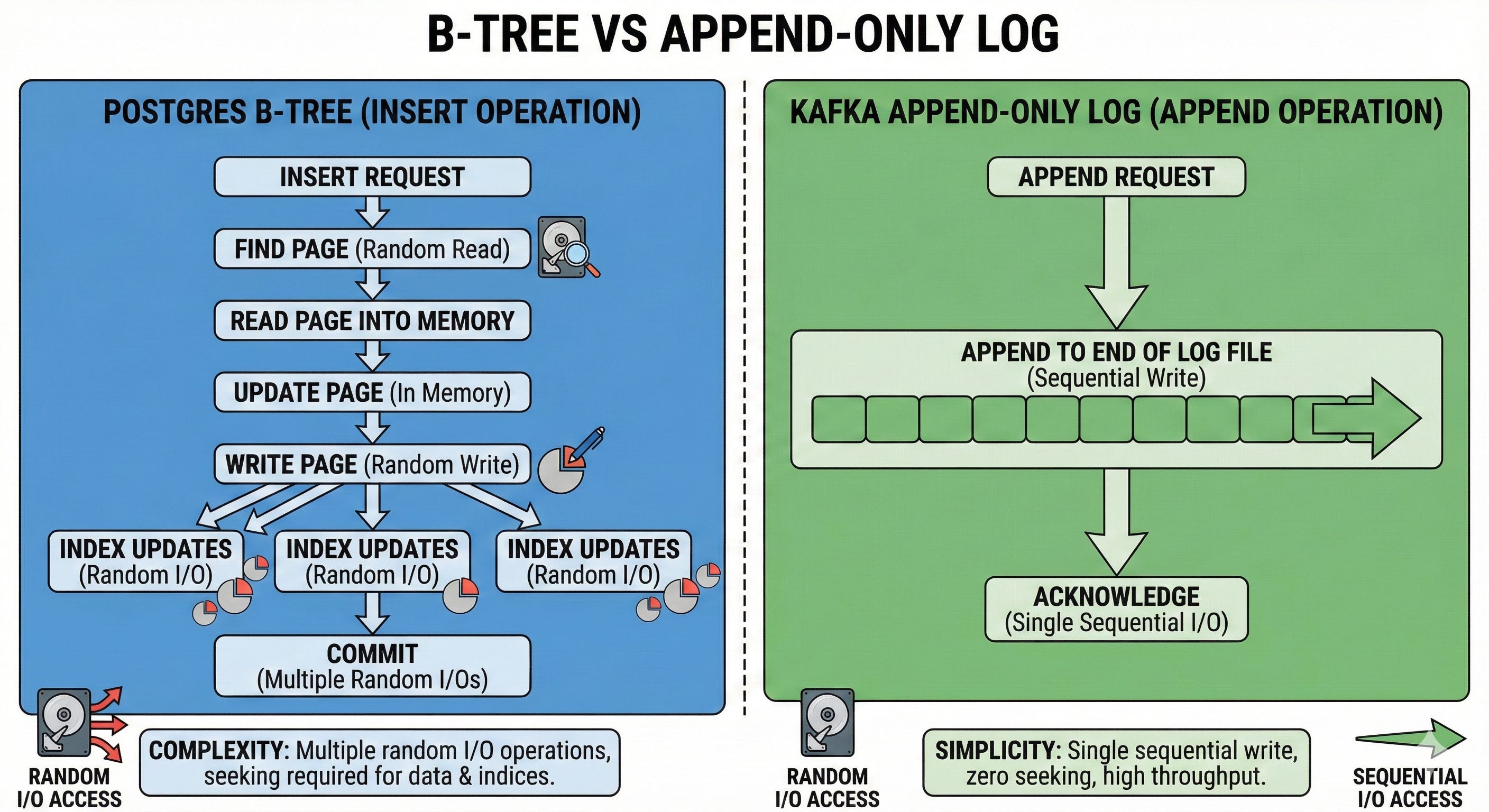
Each insert updates multiple B-Tree indexes. Each index update requires seeking to a random page on the disk. Even on an enterprise SSD, a random seek takes ~100 microseconds.
1,000,000 random seeks × 100 microseconds = 100 seconds of pure seek time.
It is mathematically impossible to process that in one second.
Kafka doing 1M sequential appends
Kafka writes to the end of a log file. There is no seeking. A modern hard drive sequentially writes at ~200 MB/sec.
1,000,000 writes × 1KB each = 1 GB.
At sequential speeds, that takes roughly 5 seconds on a single cheap disk, and is trivially parallelized across 5-10 disks in a JBOD (Just a Bunch of Disks) configuration to handle it in 1 second.
The lesson here. Sequential disk beats random RAM when throughput matters more than latency.
This is why Kafka doesn’t need NVMe. It just needs sequential access patterns.
What’s the throughput of your production database doing sequential scans vs. indexed lookups? If you don’t know, you’re optimizing blind.
How Kafka Enforces Sequential I/O
Unlike relational databases, which rely heavily on B-Trees to enable fast random lookups, Kafka is built around a single, aggressively simple data structure. The Commit Log.
When a message arrives at a Kafka broker, the system does exactly one thing, it appends the message to the end of the current log segment (a raw file on disk).
It never updates existing entries.
It never seeks backward to modify a state.
It writes in large batches (saving multiple messages in a single system call).
Why does this work so perfectly?
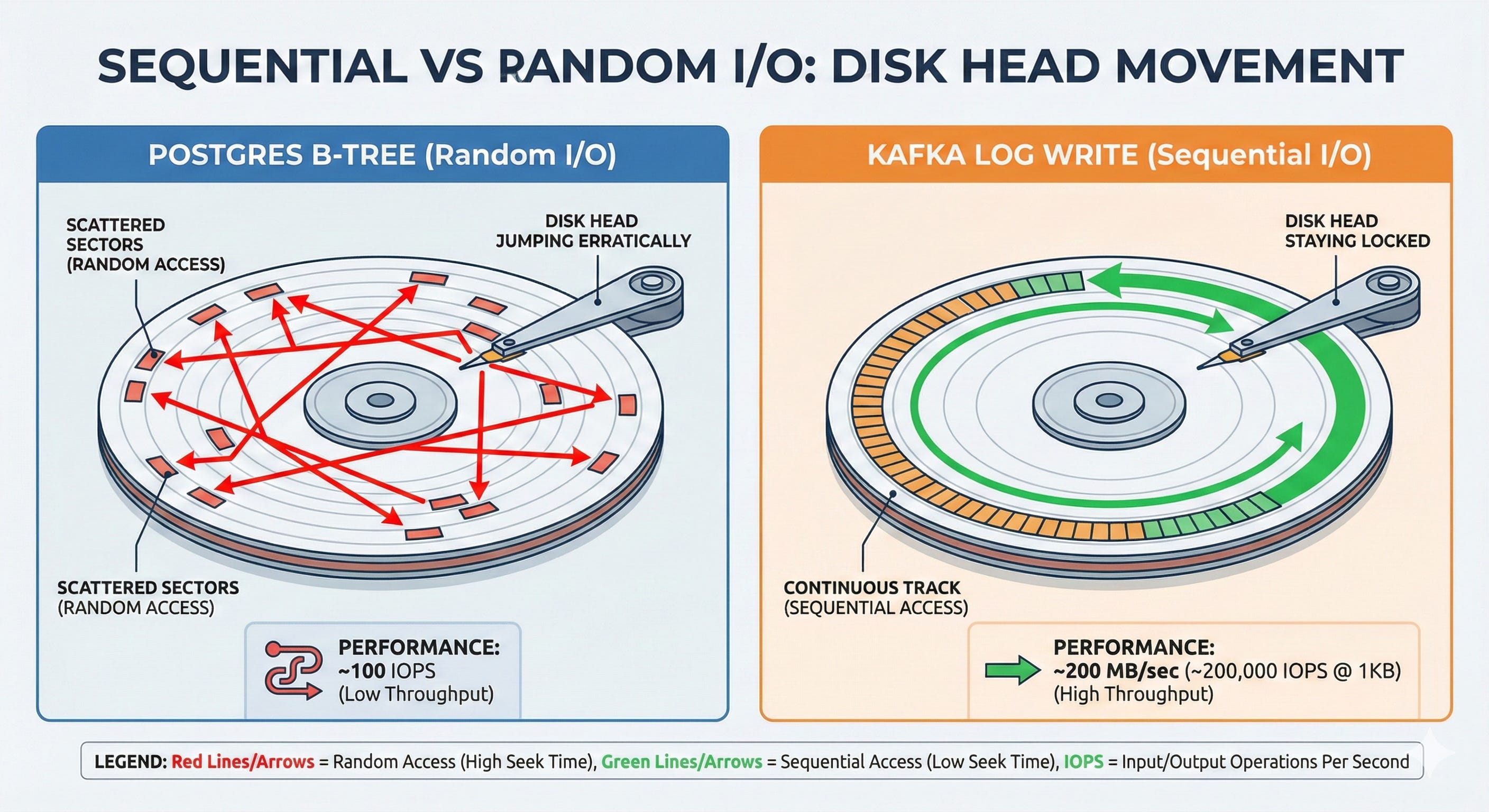
Hard drives have a mechanical read/write head. To read or write data, that head must physically move across the platter to find the correct sector.
This is why random I/O is so devastatingly slow, the mechanical arm is constantly repositioning. It is physically vibrating.
But when you strictly append to the end of a file, the head drops into position and stays there. The disk controller can stop worrying about seek times and optimize entirely for pure throughput.
You are essentially turning a hard drive into a firehose.
If you add batching, writing 100 messages per write() syscall instead of 1, you reduce the CPU context-switch overhead by 100x while keeping the disk arm perfectly still.
The Trade-off Kafka Makes
Databases optimize for flexibility, random access (give me record ID 47293), updates in place (change this user’s email), and complex queries (JOIN across three tables).
Kafka completely abandons this. It optimizes strictly for append-only writes (add this event), sequential reads (replay messages in order), and time-based queries (give me all events from 2:00 PM).
This is a conscious architectural choice, not magic. By refusing to support random updates, Kafka gets to use the fastest possible I/O pattern the hardware offers.
Look at Netflix. They log every single user interaction (play, pause, seek, stop) to Kafka. At peak, that is hundreds of thousands of events per second from millions of concurrent users.
Netflix doesn’t need to query “what did user X do exactly 4 seconds ago?” in real-time. They need to capture the firehose of data and process it asynchronously.
A B-Tree database would collapse under that write load. Kafka’s append-only log absorbs it effortlessly.
Look at your highest-volume write workload.
Is it actually appending events, or are you using INSERT/UPDATE simply because “that’s what databases do”?
Kafka Doesn’t Manage Memory
If you write a standard application that interacts with a disk and a network, your data flow generally looks like this
Read data from disk into a kernel buffer.
Copy data from the kernel buffer to application memory (like the JVM heap).
Process the data.
Copy data from application memory back to a kernel socket buffer.
Write to the network socket.
At extreme throughput, this standard pattern creates two massive system bottlenecks.
1. Garbage Collection Death
Every message object allocated in the JVM heap must eventually be garbage collected.
If you are pushing 1,000,000 messages per second through application memory, the Garbage Collector cannot keep up.
You will experience massive “stop-the-world” pauses that instantly kill your throughput and trigger network timeouts.
2. Double Buffering
Your data exists in two places at once, kernel memory (the OS page cache) and application memory (the JVM heap).
You are wasting RAM, and more importantly, you are wasting CPU cycles copying the exact same bytes back and forth between user space and kernel space.
Kafka’s Solution
Bypass Application Memory Entirely.
Kafka does not attempt to manage a complex internal buffer pool. It relies entirely on the Linux OS Page Cache.
When Kafka writes a message, it calls write() to append to the log file. The OS buffers this write in the page cache in RAM. Kafka immediately returns a success acknowledgment to the producer.
The Linux kernel flushes that page cache to the physical disk asynchronously in the background.
When Kafka reads a message, the OS loads the file into the page cache. Kafka references the page cache directly. The message data is never copied into the JVM heap. Therefore, there is no garbage collection penalty.
Modern operating systems are ruthlessly efficient at managing file caches. Linux will gladly use 100% of your free RAM as a page cache. Kafka doesn’t try to outsmart the OS, it defers to the kernel.
The practical result?
A Kafka broker with 64 GB of RAM effectively has ~4 GB dedicated to the JVM heap (which is tiny), and ~60 GB dedicated to the OS page cache.
Consumers reading recent data get RAM-speed access because the OS serves it directly from the cache. Older messages fall out of cache and are read from disk, but because it’s sequential, it remains incredibly fast.
Postgres must manage its own complex buffer pool because it supports random updates, ACID transactions, and row-level locking.
Kafka can rely entirely on the OS because it only does sequential access.
Zero-Copy
This brings us to the centerpiece of Kafka’s architecture.
The fastest code is the code that never runs. Zero-Copy means the CPU doesn’t touch your data.
That’s why it’s fast.
The Traditional Data Path (4 Copies)
When a consumer requests a batch of messages from Kafka, a naive implementation would execute the following path
Disk → Kernel Buffer - Via DMA - Direct Memory Access. Hardware does the work.
Kernel Buffer → Application Buffer - CPU copies data from kernel space into the Kafka JVM heap.
Application Buffer → Socket Buffer - CPU copies data from the JVM back to the kernel network stack.
Socket Buffer → NIC - Via DMA to the Network Interface Card.
At each copy boundary, you suffer. CPU cycles are wasted. You force expensive context switches between user space and kernel space. You pollute the CPU L1/L2 caches, evicting hot application state just to make room for transient message bytes that are passing through.
At scale, serving 1,000,000 messages/sec means copying 1 GB/sec four times. That is 4 GB/sec of memory bandwidth consumed just moving the exact same bytes around the motherboard.
On our massive c8g.48xlarge server, the CPU would be saturated just copying data, doing absolutely zero actual processing.
The Zero-Copy Solution
sendfile() Linux provides the sendfile() syscall (and its cousin splice()) to solve this exact bottleneck.
// Traditional approach (CPU intensive)
read(file_fd, buffer, size);           // Copy from kernel to app
write(socket_fd, buffer, size);        // Copy from app to kernel

// Zero-copy approach (Hardware accelerated)
sendfile(socket_fd, file_fd, offset, size);  // Copy directly kernel-to-kernel
What actually happens under the hood when Kafka uses zero-copy?
Disk → Kernel Page Cache - DMA read.
Page Cache → Socket Buffer - A kernel-to-kernel copy. User-space is completely bypassed.
Socket Buffer → NIC - DMA write.
The message data never enters Kafka’s application memory. Kafka simply issues a command to the Linux kernel,
“Take 500 bytes from file descriptor Z at offset X, and stream them directly into network socket W.”
The kernel and the DMA controllers handle everything.
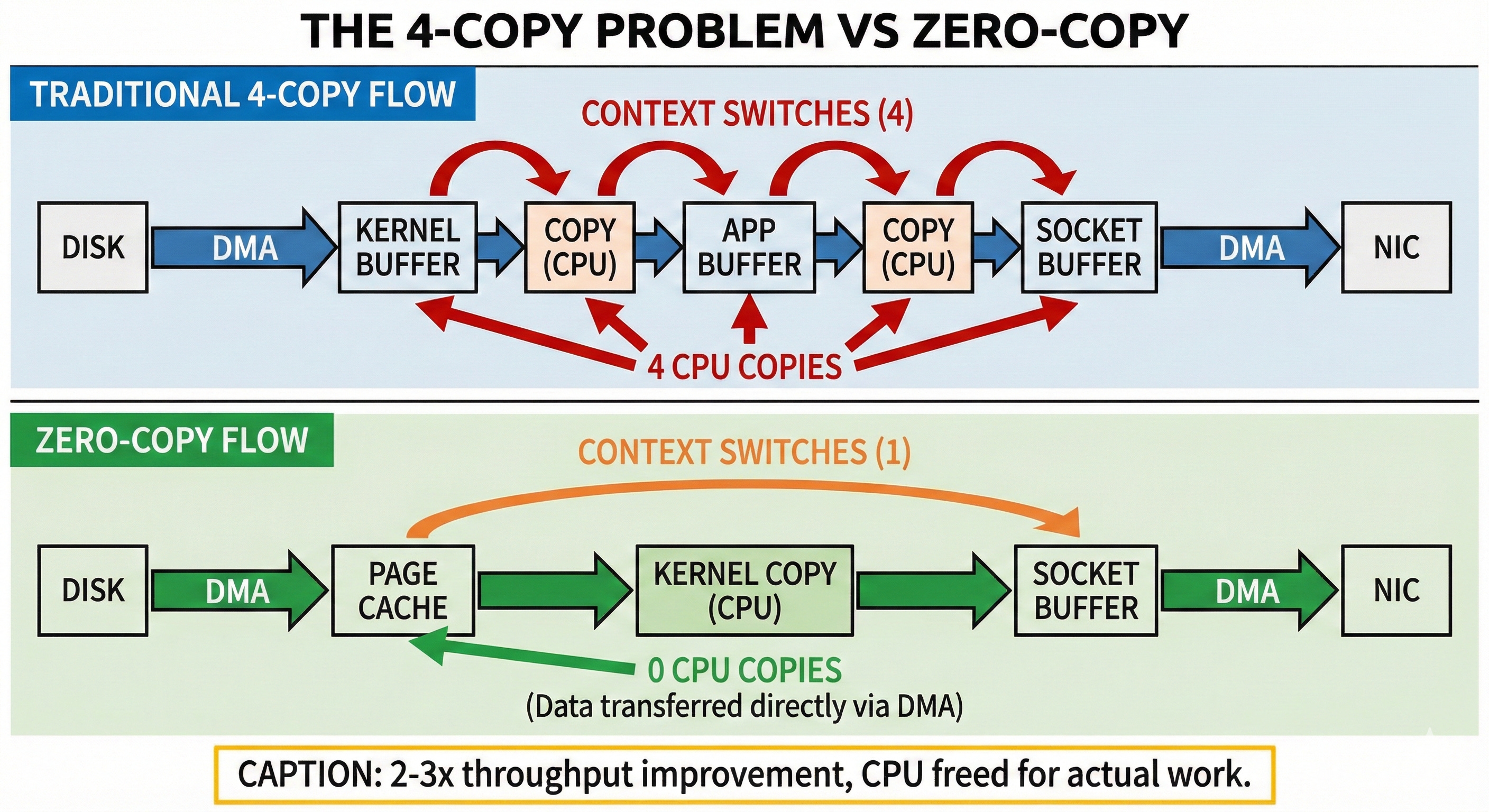
Instead of 4 copies, you get 2 copies (and both are heavily hardware-accelerated). Instead of 4 expensive context switches, you get 1. Instead of thrashing the CPU cache, you keep it pristine for actual orchestration logic.
LinkedIn engineering published benchmarks demonstrating that zero-copy improves Kafka’s throughput by 2-3x for consumer reads. At 1M messages/sec, that is the literal difference between needing a cluster of 3 massive servers versus 1 server.
Why traditional message queues can’t do this
RabbitMQ, ActiveMQ, and traditional enterprise queues usually transform messages (adding headers, parsing routing keys), encrypt payloads in the application layer, or apply middleware.
All of these actions require the message to be pulled into application memory so the CPU can inspect and alter the bytes.
Kafka’s messages are opaque byte arrays. Kafka does not parse them, it does not transform them, and it does not care about their contents.
This architectural constraint allows Kafka to use zero-copy. The broker is just a dumb, incredibly fast pipe moving bytes from a disk to a network card.
How many times is your data copied between receiving it and sending it? Every single copy is CPU waste you are paying for on your AWS bill.
When to Use This Pattern
Understanding how Kafka works is only half the battle. You need to know when to apply these principles, append-only logs and zero-copy transfers to your own systems.
This pattern WORKS when
Write-heavy, read-sequential workloads
Event logging, audit trails, analytics ingestion pipelines, and background job queues.
Messages are opaque blobs
You don’t need the broker to parse, transform, or route based on content. Consumers handle the deserialization.
Recent data is hot, old data is cold
99% of your reads are for data written in the last few minutes (guaranteeing a page cache hit). Occasional historical reads (requiring a disk seek) are acceptable.
Durability matters, but immediate consistency does not
Relying on the OS page cache flush (write-behind caching) is “good enough,” and you don’t need to force an fsync() to the physical platter on every single write.
This pattern DOES NOT work when
Random access queries
“Give me user 47293’s profile.” (Use a traditional database).
Low-latency single-message processing
If you need sub-millisecond latency per message, Kafka isn’t the tool. Zero-copy optimizes for massive batch throughput, not single-message latency.
Message transformation in the broker
If your broker must decrypt, dynamically route, or mutate messages, you cannot use zero-copy because you must pull the data into application memory.
Before reaching for Postgres, Redis, or MongoDB for a high-volume endpoint, ask yourself
“Am I appending events, or am I updating records?”
If your workload is append-mostly and sequential-read, you are leaving 10x performance on the table by using a general-purpose B-Tree database.
Consider Kafka for event streams, ClickHouse for analytics, or InfluxDB for time-series metrics.
All of them use append-only logs. All of them respect sequential I/O.
Conclusion
In my 1M RPS test, Postgres failed not because it was poorly designed, but because it was designed for a entirely different problem space.
Postgres optimizes for maximum flexibility, random updates, complex queries, and strict ACID guarantees. To deliver this flexibility, it must use B-Trees, endure random I/O, and manage its own application buffers.
Kafka optimizes for maximum throughput, append-only writes, sequential reads, and eventual consistency. To deliver this throughput, it uses commit logs, demands sequential I/O, and relies entirely on kernel-managed caching.
Neither system is “better.” They solve different physical problems.
The lesson here isn’t “use Kafka instead of Postgres.”
The lesson is, understand the physics of your hardware, and then choose the data structure that ruthlessly exploits it.
Sequential disk is faster than random RAM. Zero-copy is faster than application processing. The Linux OS page cache is smarter than your hand-rolled buffer pool.
Stop fighting the metal. Start respecting it. When you align your architecture with the strict constraints of the underlying hardware, you don’t need to scale out to hundreds of servers. You can handle 1 million writes per second on a $40 hard drive.
That’s not magic. That’s engineering.